
Overview
Controls is one element of our software stack, coming in after Perceptions and Path Planning.
Below is a top-down deep dive into how the controller works. You can stop at any level of abstraction you prefer. While we only assume basic programming knowledge, feel free to read more into the software that the controller depends on, namely C++, ROS2 Humble, CUDA, and Thrust. We also provide a cheat sheet of common Terminology.
Have fun and enjoy the ride!
What is Controls?
Section titled “What is Controls?”Controls is the prcess of taking in information about the vehicle’s state, e.g. its position and velocity, in relation to the outside world, e.g. the track set out by the cones, and calculating the optimal control action to take, e.g. throttle and steering wheel angle.
How does it work?
Section titled “How does it work?”Controls is our custom ROS2 package that contains the controller node.
The controller hinges on 3 things:
- A novel state estimation / projection pipeline.
- Our state of the art implementation of the MPPI (Model Predictive Path Integral) algorithm.
- An efficient dynamics model that is used for both state estimation and MPPI.
They provide the following functionality:
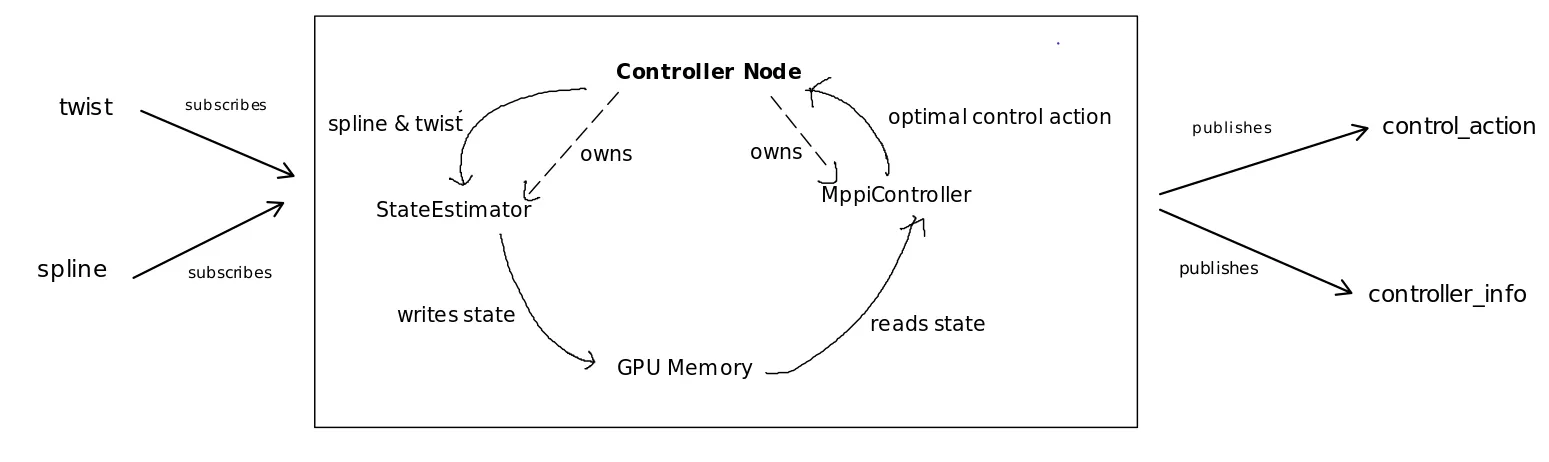
- State Estimator: given twist and spline, estimates inertial state and a inertial to curvilinear lookup table.
- MPPI Controller: given inertial state and the lookup table, calculates the optimal control action to take.
The inertial state and curvilinear lookup table are shared through GPU global memory.
This diagram shows this relationship:
Implementation
Section titled “Implementation”As for the node itself, these are the implementation details:
Initialization: Construction creates subscribers and publishers, then launches MPPI in a new thread.
Callbacks
- Spline: Updates the state estimator with the most recent set of spline points. Notifies MPPI thread that the state is dirty.
- Twist: Updates the state estimator with the most recent twist. Notifies MPPI thread that the state is dirty.
These callbacks are mutually exclusive.
MPPI Thread: Loops continuously. Waits to be notified that state is dirty (i.e. new incoming message). When notified, does state estimation, then runs MPPI. Publishes the control action and controller info.
Runtime Variables
Section titled “Runtime Variables”We found that the compilation times to be a nontrivial slow down to our very limited track tests. A single compilation after a controller parameter change takes approximately 1 minute. To address this, we implemented runtime parameters.
During runtime (rather than compile time), a configuration file for the controller constants is passed in.
For CUDA constants, we utilize CUDA’s __constant__ flag as well as cudaMemcpyToSymbol to set CUDA variable values.